E-commerce App
Overview
The Ionic Team has put together an E-commerce demo application for Android and iOS that uses both native layouts and web-based Portals. The Android application uses Fragments while the iOS application uses Storyboard/ViewController based views.
Below is a list of which portions of the app are native and which portions of the app are portals.
Native Screens
- List of Products Page
- Individual Product Page
- Cart Page
Web Screens
- Checkout Page
- Help Page
- User Details Page
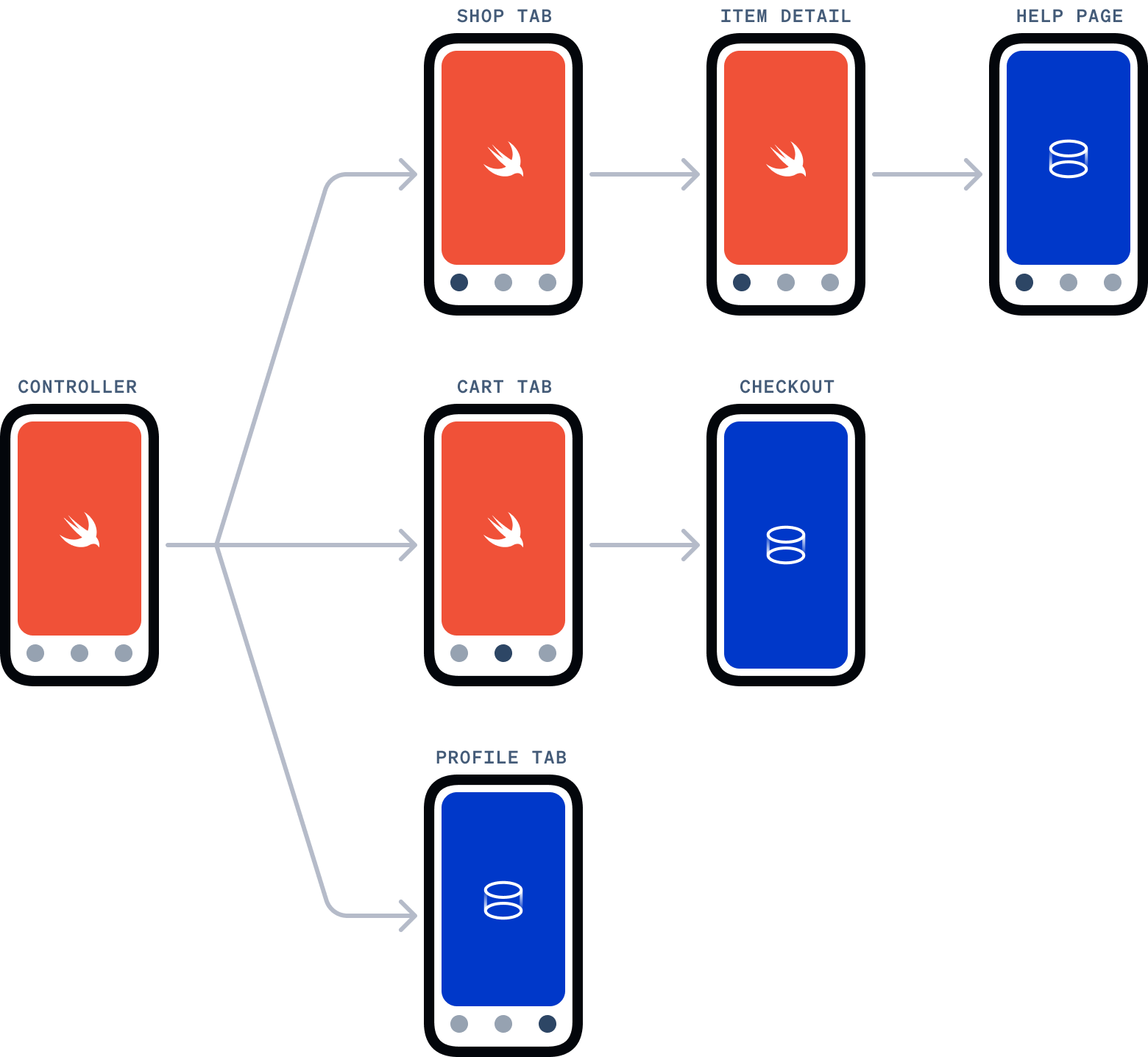
The source is available on GitHub and includes the iOS, Android, and Web projects.
Highlights
Native
The iOS application uses ViewControllers for each page in the app. The main navigation is built using Storyboard with a UITabBarController to navigate between the three main different sections of the application: the Products page, Cart page, and the User Details page.
Cart Portal
The Portal used to present the shopping cart web application is displayed as an overlay with the PageSheet style, demonstrating Portals use in a modal view.
Help and User Details Portal
The Help and User Details pages display the portal in a ViewController. These are implemented the same way, however the User Details page is displayed as the third tab in the main application navigation Storyboard.